Short answer: a small business AI policy is a short document, often one page, that says which AI tools staff may use, what information must never go into them, which AI outputs a person must check, when to tell customers AI was used, and who to ask with questions. It protects customer data, keeps quality high and gives your team confidence to use AI well.
This guide is general information, not legal advice. If you work in a regulated field or handle sensitive data, check your obligations with a qualified professional.
Why does a small business need an AI policy?
Many employees already use AI tools at work, sometimes on personal accounts. Without simple rules, customer details can end up in tools you have not approved, AI mistakes can reach customers, and nobody is sure what is allowed. A policy turns that into clear, shared habits.
What should a small business AI policy include?
| Section | What it says | Example |
|---|---|---|
| Purpose | Why you use AI | Save time on admin and drafting, never replace judgment |
| Approved tools | Which tools and accounts | Business accounts of approved assistants only |
| Data rules | What never goes into AI | Passwords, card numbers, health details, private customer data |
| Human review | What a person must check | Anything sent to customers, prices, legal or financial content |
| Disclosure | When to tell people AI was used | AI chat assistants and AI-generated images |
| Ownership | Who to ask and who approves new tools | The owner or office manager |
| Training | How staff learn the rules | A 30-minute session for new staff |
| Review | When the policy is updated | Every few months |
For more detail on the data rules, read AI data privacy for small business. If your team uses AI note-takers, see AI meeting notes.
What does a one-page AI policy look like?
Adapt this outline to your business:
- Purpose: we use AI to save time and improve quality, and people stay responsible for the results.
- Approved tools: list each tool and say to use business accounts only.
- Never enter: passwords, payment details, ID numbers, health information, or private customer data unless the tool is approved for it.
- Always check: facts, prices, names and tone before anything AI-assisted goes to a customer.
- Be open: tell customers when they are talking to an AI assistant, and label AI-generated images where they could be mistaken for real photos.
- New tools: ask the owner before signing up for a new AI tool for work.
- Problems: report mistakes or data concerns straight away, with no blame.
- Review date: this policy is reviewed every few months.
How do you roll out an AI policy?
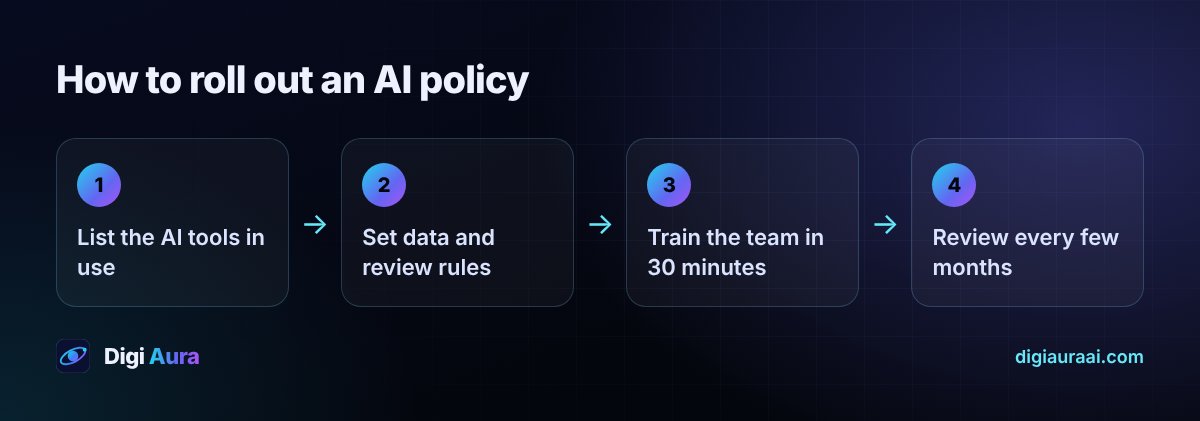
- Ask your team which AI tools they already use, without blame, so the policy reflects reality.
- Pick approved tools with business plans and clear data terms. Our guide to ChatGPT vs Claude for small business covers what to check.
- Hold a short training session with real examples of good and bad use.
- Keep it visible, for example pinned in your team chat.
- Review it when you add tools or something goes wrong.
How does an AI policy fit with your AI strategy?
Your strategy says what AI should achieve; your policy says how people use it safely. Read our AI business strategy guide for the planning side, and try our free AI readiness assessment to see where you stand. If you want help choosing tools and setting rules, our AI consulting services cover both, and our AI automation services build approved workflows your team can rely on.
Frequently asked questions
Does a small business need an AI policy?
If anyone on your team uses AI tools for work, a short policy is worth having. It protects customer data and sets clear expectations.
How long should an AI policy be?
One or two pages is enough for most small businesses. Clear rules people remember beat a long document nobody reads.
Should employees use personal AI accounts for work?
It is safer to use business accounts of approved tools, which usually offer stronger data controls and let you manage access.
What information should never go into AI tools?
Passwords, payment card details, ID numbers, health information and private customer data, unless the tool is specifically approved for that data.
Do I need to tell customers when I use AI?
It is good practice to tell customers when they are talking to an AI assistant and to label AI-generated images that could be mistaken for real photos. Some rules and platforms also require it.
Want help setting up AI tools and rules your team can trust? Book an AI consultation.