
Short answer: to respond to Google reviews with AI, give an AI assistant the review, your business details and a short guide to your tone, and ask for a short, personal reply that mentions something specific from the review. Edit it, then post it from your Google Business Profile. Let AI draft replies to positive and neutral reviews, but read negative reviews carefully yourself and take serious complaints offline.
Why reply to Google reviews at all?
Replies show future customers that you listen and care. A thoughtful reply to a negative review can matter as much as the review itself, because people judge how you handle problems. Reviews and replies are also public text about your business that search engines and AI assistants can read.
How do you use AI to reply to reviews?
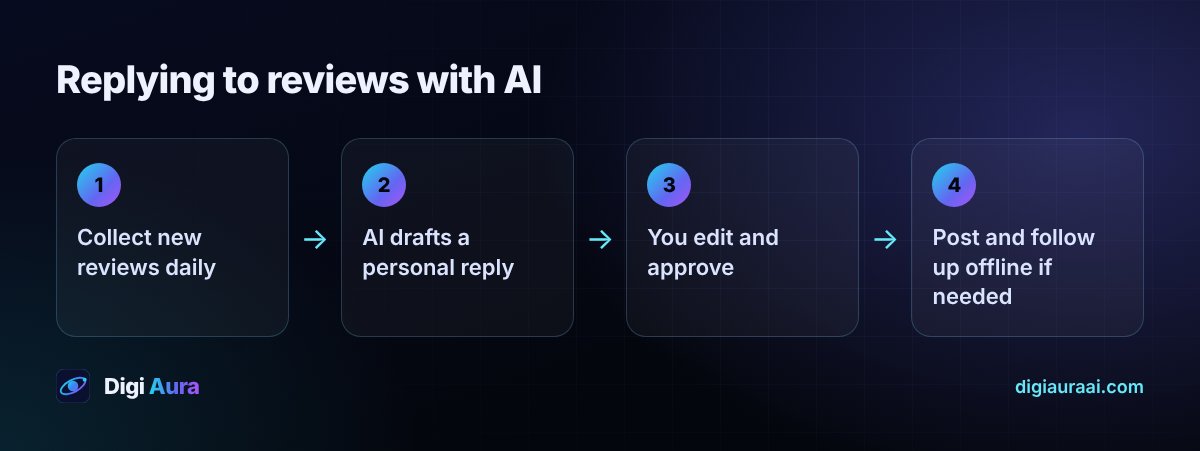
- Write a short tone guide: how you greet people, how you sign off, words you avoid.
- Paste in the review and ask for a reply under 60 words that thanks the person, mentions a specific detail and invites them back.
- Ask for two versions, then pick and edit the better one.
- Check facts: never confirm details about a customer's private information or situation.
- Post it from your Google Business Profile.
What should replies to different reviews include?
| Review type | What the reply should do | AI's role |
|---|---|---|
| 5-star with details | Thank them, mention the detail, invite them back | Draft, light edit |
| Short positive | Short thanks, vary the wording | Draft several options |
| Mixed | Thank them, acknowledge the issue, say what you are doing | Draft, careful edit |
| Negative | Apologize for the experience, offer to talk directly, no arguing | Draft only as a starting point |
| Fake or abusive | Report through the platform; reply calmly if at all | Do not rely on AI |
What should you never let AI do with reviews?
- Post replies automatically without a person reading them.
- Write fake reviews or reviews for your business. This is dishonest and breaks platform rules and consumer protection laws.
- Share customer details in a public reply.
- Use the same reply everywhere. Repeated replies look automated and careless.
- Argue. Even when a review is unfair, a calm reply looks best to readers.
How do you get more reviews in the first place?
Ask at the right moment, after a job is done and the customer is happy, with a direct link to your review page. You can automate the request message, as described in our list of AI automation ideas for small businesses. Never offer rewards for positive reviews only.
Should you hand review replies to someone else?
If you get a handful of reviews a week, the steps above take minutes. If you would rather hand it off, our social media management and AI content creation services can draft replies for your approval. For the bigger picture, read AI marketing for small business.
Frequently asked questions
Can I use AI to respond to Google reviews?
Yes. AI can draft personal replies quickly. A person should read and edit each reply before it is posted, especially for negative reviews.
Should I reply to every Google review?
Replying to every review, or as many as you can, shows you value feedback. Prioritize negative and detailed reviews.
How long should a review reply be?
Short. Two to four sentences is usually enough: thanks, a specific detail and an invitation or next step.
How do I reply to a negative review?
Stay calm, apologize for the experience, avoid details about the customer, and invite them to contact you directly to sort it out.
Is it okay to use AI to write reviews?
No. Writing fake reviews, with or without AI, is dishonest and against platform rules and consumer protection laws.
Want help keeping up with reviews and social media? Book an AI consultation.