Short answer: the best AI automation ideas for a small business are repetitive tasks that follow clear rules and eat time every week: replying to new leads, answering common questions, entering data from forms and emails, sending reminders, drafting social posts and summarizing reports. Start with one task that happens often, is easy to measure and does not need a judgment call every time.
Below are 15 ideas grouped by business area, followed by a simple way to choose where to begin.
What are the best AI automation ideas for sales?
- Instant replies to new leads. AI sends a helpful first reply within minutes, using your approved answers. See how to automate lead follow-up.
- Lead qualification. A few friendly questions about needs, timing and budget, with answers saved to your CRM.
- Follow-up reminders. The team gets a nudge when a quote or lead goes quiet, with a draft message ready to approve.
What can AI automate in customer service?
- Answering common questions about hours, services, prices you publish and policies, on your website or in messages.
- After-hours call answering and booking with an AI receptionist. Read how an AI receptionist works.
- Review request messages after a job is done, sent at the right moment.
Our guide to automating customer service covers these in more detail.
Which admin tasks can AI automate?
- Data entry from forms and emails into your CRM, spreadsheet or job system.
- Document processing, such as pulling key details from invoices, orders or applications. See AI invoice processing.
- Appointment reminders and confirmations to cut no-shows.
- Meeting and call summaries with action points sent to the right people. See AI meeting notes.
How can AI automate marketing tasks?
- Drafting social media posts from your offers and photos, for review. See how to automate social media posts.
- Turning one piece of content into many, for example a blog post into an email and three social posts.
- Personalized email follow-ups based on what a customer bought or asked about.
What can AI automate in finance and reporting?
- Weekly summaries of sales, bookings and inquiries, delivered by email.
- Spotting unusual numbers, such as a sudden drop in bookings, so a person can check early.
How do you choose the right first automation?
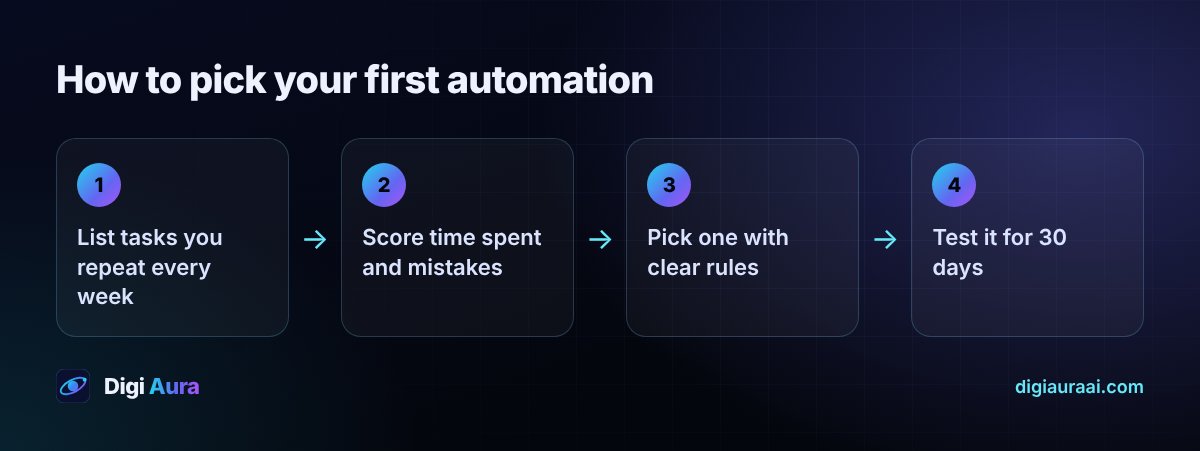
| Question | Good first project | Leave for later |
|---|---|---|
| How often does it happen? | Daily or weekly | A few times a year |
| Does it follow clear rules? | Yes, mostly | Needs judgment every time |
| Can you measure it? | Hours saved, reply time | Hard to tell |
| What if it goes wrong? | Easy to spot and fix | Affects money, legal or health decisions |
Try our free AI readiness assessment for a quick view of where your business stands, or play with the AI Day Simulator to see how a day changes with automation.
Do you need special software to automate with AI?
Usually not at the start. Most ideas above use tools you already have, such as email, a calendar, a CRM or spreadsheet, plus an automation platform with AI steps. Our guide to what AI automation is explains how the pieces fit. If you would rather have it built for you, see our AI automation services and custom AI agents.
Frequently asked questions
What is the easiest thing to automate in a small business?
Instant replies to common questions and new inquiries are usually the easiest, because the answers are already known and the time saving is easy to see.
Which tasks should not be automated?
Anything that needs careful judgment or carries real risk, such as complaints, refunds, legal or medical advice and large payments, should stay with a person, with AI helping at most by drafting.
How long does it take to set up an AI automation?
A simple automation can be running within days. Projects that connect several systems or handle customer data take longer because they need more testing.
Will automation replace my staff?
For most small businesses, automation takes over repetitive admin so people can spend more time with customers. It works best with a person checking the results.
How do I know if an automation is working?
Measure one thing before and after, such as hours spent per week, reply time or no-show rate, and review it after 30 days.
Want help choosing your first automation? Book an AI consultation and we will map it out with you.