Short answer: AI invoice processing reads invoices that arrive by email or upload, pulls out the key details such as supplier, invoice number, dates, line items, tax and total, checks them against your rules or purchase orders, and sends them to your accounting software for a person to approve. It saves typing time and catches mistakes, but payments should always stay under human approval.
How does AI invoice processing work?
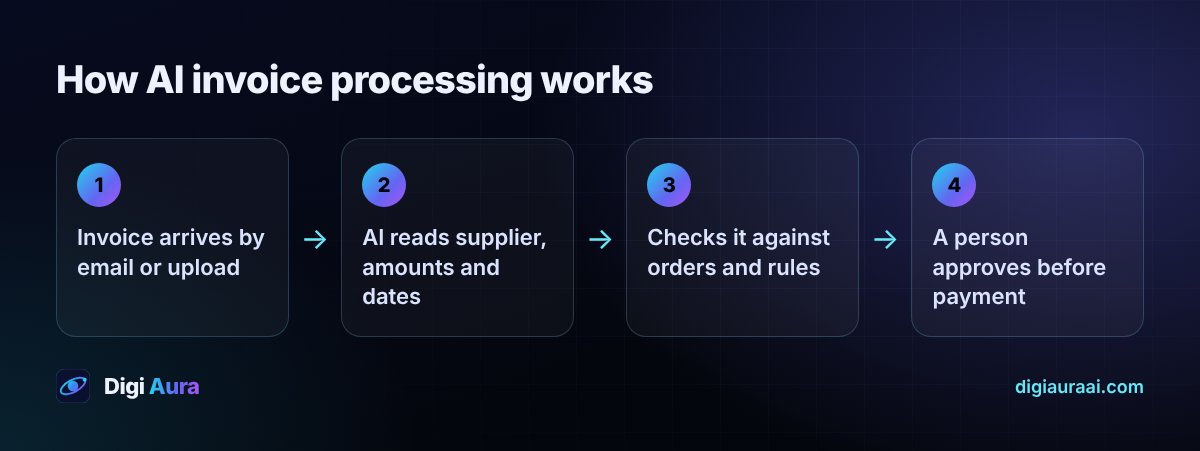
- Capture. Invoices arrive in a dedicated inbox or are uploaded as PDFs or photos.
- Extract. AI reads the document and pulls out the supplier, invoice number, dates, line items, tax and total.
- Check. It compares the invoice with purchase orders, delivery notes or past invoices, and flags duplicates or unusual amounts.
- Code. It suggests the right expense category based on how you coded similar invoices.
- Approve. A person reviews flagged items and approves payment.
- Sync. The approved invoice goes into your accounting software with the document attached.
What can AI catch that people often miss?
- Duplicate invoices sent twice or with small changes.
- Price differences from what was agreed or ordered.
- Changed bank details, which can be a sign of fraud and should always be verified by phone using a number you already have.
- Missing information, such as a tax ID or purchase order number.
- Due dates, so you avoid late fees.
What should stay with a person?
| Step | AI | Person |
|---|---|---|
| Reading and typing details | Yes | Spot checks |
| Flagging duplicates and unusual amounts | Yes | Decides what to do |
| Suggesting expense categories | Yes | Confirms for new suppliers |
| Approving payment | No | Always |
| Changing supplier bank details | No | Always, after verification |
How do you set up AI invoice processing?
- Create one inbox for all supplier invoices.
- Check your accounting software first: many now include AI invoice capture, so you may not need a new tool.
- Write your approval rules, such as amounts that need a second approver.
- Start with a few suppliers, compare the AI's results with your own for a month, then expand.
- Keep the originals so you can check any extracted figure.
Invoice processing is one of our favorite AI automation ideas for small businesses because the time saving is easy to measure. Read what AI automation is for how the pieces connect.
Is AI invoice processing safe?
It can be, with the right controls. Use tools with clear data terms, limit who can approve payments, and treat any request to change bank details as suspicious until verified. Never let an automation release payments on its own.
Should you set it up yourself or get help?
If your accounting software has built-in invoice capture, try that first. Outside help makes sense when invoices need to be matched against orders in another system, or when you want approvals and alerts across several tools. Our AI automation services build these workflows, and our AI dashboard development can show spending and due dates in one place. Accountants and bookkeepers can also see our AI for accountants page.
Frequently asked questions
What is AI invoice processing?
It is the use of AI to read invoices, extract their details, check them against your rules and send them to your accounting software for approval.
Can AI read handwritten or photographed invoices?
Often yes, though accuracy is lower with poor photos or handwriting. Flag low-confidence results for a person to check.
Does AI invoice processing replace a bookkeeper?
No. It removes typing and catches errors, while a bookkeeper or owner still reviews, approves and handles exceptions.
How accurate is AI invoice extraction?
It is usually accurate on clear, standard invoices, and less so on unusual layouts. Spot-check results, especially in the first weeks.
What is the biggest risk with invoice automation?
Paying a fraudulent or duplicate invoice. Keep human approval for payments and verify any change of bank details by phone.
Spending hours typing invoices? Book an AI consultation to see what can be automated.