Short answer: AI automation means using artificial intelligence to carry out tasks that normally need a person to read, decide or write, such as sorting incoming emails, pulling details out of a form or drafting a reply. It goes a step beyond regular automation, which can only follow fixed "if this, then that" rules.
For a small business, AI automation is less about robots and more about getting back the hours lost to copy-paste work, chasing leads and answering the same questions over and over.
What is the difference between automation and AI automation?
Regular automation follows rules you set in advance. When a form is submitted, add a row to a spreadsheet. When an invoice is paid, send a receipt. It is reliable, but it breaks the moment the input is messy or unexpected.
AI automation adds a layer that can understand language and make simple judgments. It can:
- Read an email and work out whether it is a new lead, a complaint or a supplier invoice.
- Extract names, dates, addresses and amounts from free text or a PDF.
- Summarize a long message or a call transcript in a few lines.
- Draft a reply, a quote description or a social post for a person to approve.
- Classify inquiries by urgency or service so the right person sees them first.
In practice, most useful setups combine both: rules handle the predictable steps, and AI handles the parts that need reading or writing.
How does AI automation work?
A typical AI automation has three parts:
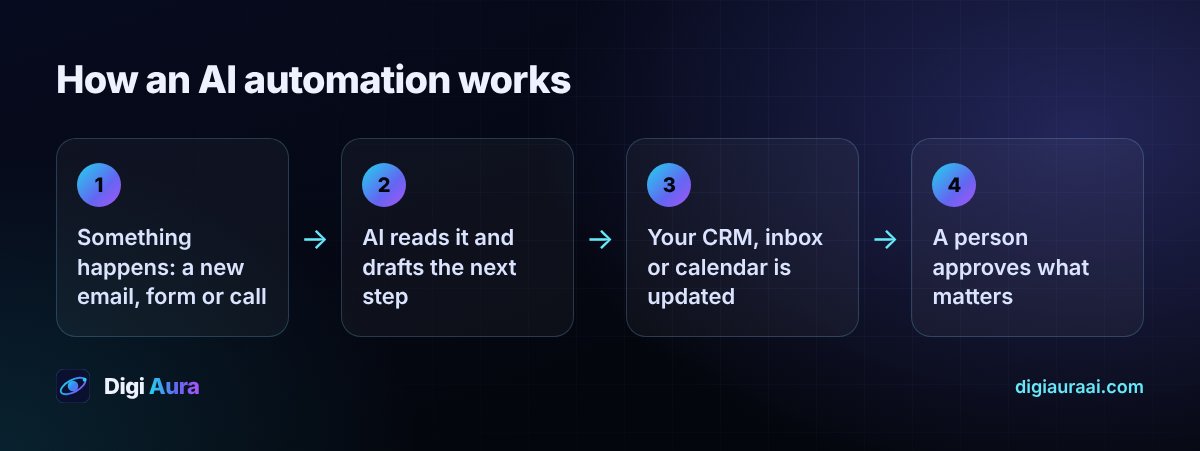
- A trigger: something happens, like a new email, form entry, booking or missed call.
- AI steps: an AI model reads the information, extracts what matters and decides or drafts the next step, within limits you set.
- Actions in your tools: the result is saved to your CRM, sent as an email, added to your calendar or flagged for a person.
The tools that connect these parts can be automation platforms, the AI features inside software you already use, or a custom build. The best choice depends on your apps, your budget and how much control you need. Our guide to the best AI tools for small business compares the main types.
What can a small business automate with AI?

Here are practical ideas, grouped by where the time usually goes.
Leads and sales
- Reply to new website inquiries within minutes, day or night, and add them to your CRM.
- Qualify leads with a few questions, then route hot leads to a person.
- Send polite follow-ups when a quote has not been answered.
Customer service
- Answer common questions about hours, prices and services with a website chatbot.
- Answer calls after hours and take messages with an AI receptionist.
- Summarize long customer emails so staff can respond faster.
Our guide to automating customer service covers this in more depth.
Admin and documents
- Pull details from forms, emails or PDFs into a spreadsheet or CRM, with no retyping.
- Create draft quotes, proposals or invoices from your price list.
- Turn meeting notes into action lists.
Marketing
- Draft social media posts and captions from your photos and offers, then schedule them after approval. See social media management for small business.
- Turn one blog article into several social posts and an email.
Reporting
- Combine numbers from several apps into one weekly report.
- Get a short AI-written summary of what changed and what needs attention. See AI dashboards.
Which industries benefit most from AI automation?
Almost any business with repeated tasks can benefit, but the details differ by industry:
- Healthcare and dental offices: appointment reminders, intake forms and after-hours questions. See AI for dentists and medical practices.
- Real estate: fast replies to property inquiries and lead follow-up. See AI for real estate agents.
- Contractors and home services: quote requests, scheduling and job updates. See AI for contractors.
- Restaurants and salons: bookings, reminders, reviews and social posts. See AI for restaurants and AI for salons.
What should you automate first?
Start with a task that is:
- Frequent: it happens every day or every week.
- Predictable: the steps are mostly the same each time.
- Low risk: a mistake is easy to spot and fix.
- Painful: someone on your team would be glad never to do it again.
Lead follow-up and answering common questions are often good first projects because they are frequent and directly affect revenue. For more options, see our list of AI automation ideas for small businesses.
What should not be fully automated?
AI is useful, but it can make mistakes. Keep a person involved for:
- Anything involving money, contracts or legal commitments.
- Medical, legal or financial advice.
- Sensitive complaints or upset customers.
- Decisions that need judgment about a specific person.
A well-designed automation drafts, sorts and suggests, and a human approves where it matters. That is how we design every project at Digi Aura. If you are weighing up outside help, our guides to what an AI consultant does and what an AI automation agency is explain what to expect. For the bigger picture, see how to use AI in your business.
Frequently asked questions
What is AI automation in simple terms?
It is using AI to handle tasks that need reading, deciding or writing, such as sorting emails, extracting details from forms or drafting replies, so your team does less repetitive work.
Is AI automation expensive for a small business?
It does not have to be. Many automations use tools you already pay for. The cost depends on how many apps are connected and how complex the steps are, so it is best to price each project individually.
Will AI automation replace my staff?
For most small businesses, no. It takes over repetitive tasks so your team can spend more time with customers and on work that needs a human.
How long does it take to set up an AI automation?
Simple automations can often be live within a few weeks. Larger projects are best done in phases so you see value early.
Is my data safe with AI automation?
It depends on the tools and how they are set up. Choose tools with clear data policies, share only what each step needs, and limit who has access.
Not sure which tasks to automate first? Book an AI consultation and we will map your quickest wins with you, or read more about our AI automation services.