Short answer: to build an AI agent for your business, pick one clear job, write the agent's instructions and rules, give it your approved business information, connect only the tools it needs, and require a person's approval for anything risky. Then test it with real examples, launch it on a small scale and review its work every week.
An AI agent is more than a chatbot: it can take steps on its own, such as reading an email, checking your calendar and drafting a reply. That is why a careful setup matters.
What is an AI agent, in plain English?
An AI agent is software that uses an AI model to work toward a goal by taking actions with your tools, for example looking up a customer in your CRM, then drafting a follow-up email. A chatbot mainly answers questions in a conversation. Our guide to AI agents vs chatbots explains the difference in more detail.
What jobs are good for a first AI agent?
| Job | What the agent does | What a person approves |
|---|---|---|
| Lead follow-up | Replies, asks qualifying questions, updates the CRM | Quotes and special requests |
| Prospect research | Summarizes a company before a sales call | Nothing, it is internal |
| Inbox triage | Sorts emails and drafts replies | Replies before sending |
| Weekly reporting | Pulls numbers and writes a summary | The summary before it is shared |
| Booking assistant | Offers times and books calls | Changes to existing bookings |
Want to see one in action first? Try our free AI Agent Playground.
How do you build an AI agent step by step?
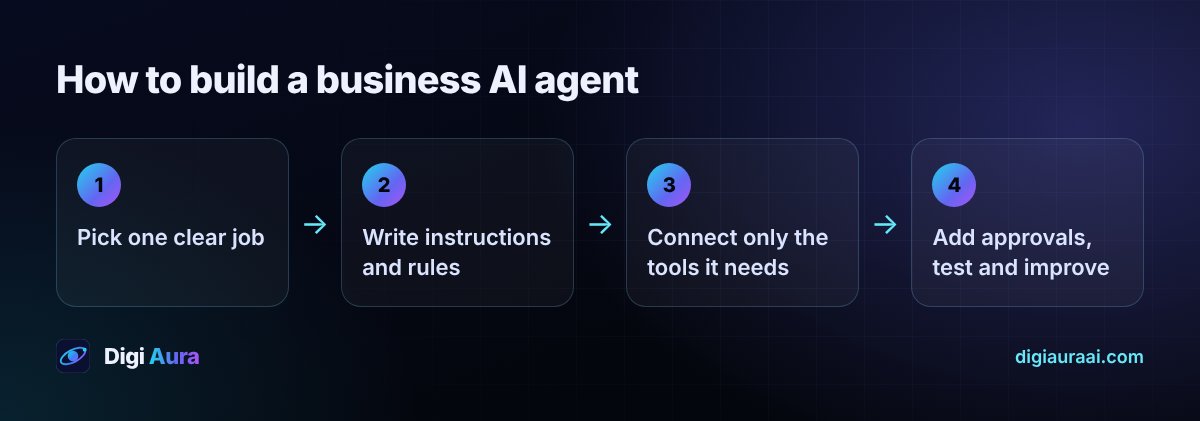
- Pick one clear job. "Reply to new website leads within 10 minutes" is better than "help with sales."
- Write the instructions. Describe the goal, the tone, what to do in common situations and what never to do.
- Give it approved information. Services, policies, prices you publish and FAQs. The agent should only answer from these.
- Choose the platform. Options include automation platforms with AI steps, agent builders from AI providers, or a custom build.
- Connect only the tools it needs. If it only drafts emails, it does not need permission to delete records or make payments.
- Add human approval for anything that sends messages to customers, spends money or changes important data.
- Test with real examples, including awkward ones: an angry customer, a question it cannot answer, a request in another language.
- Launch small and review weekly. Read a sample of what it did, fix the instructions and expand slowly.
How do you keep an AI agent safe and reliable?
- Least access: give the agent the minimum permissions it needs.
- Clear limits: tell it when to hand over to a person, and make that easy.
- Logs: keep a record of what it did and why, so you can check and fix mistakes.
- Data rules: keep passwords, card numbers and sensitive personal data out of prompts.
- Spending caps: set usage limits with your AI provider so costs cannot run away.
Should you build an AI agent yourself or hire help?
If you are comfortable with tools like automation platforms and the job is simple, building it yourself is a good way to learn. Outside help makes sense when the agent connects to several systems, handles customer data or needs to be reliable from day one. Our custom AI agents service builds, tests and maintains agents for small businesses, often alongside our AI automation services. See how to automate lead follow-up for a worked example.
Frequently asked questions
Can I build an AI agent without coding?
Yes, for simple jobs. Many automation platforms and AI tools let you build an agent with instructions and connections instead of code. More complex agents usually need some technical setup.
How long does it take to build an AI agent?
A simple agent for one job can be built and tested in days. Agents that connect to several systems or handle sensitive data take longer because they need more testing.
What is the difference between an AI agent and an automation?
A standard automation follows fixed steps. An AI agent can decide which step to take next based on the situation, within the rules you give it.
Are AI agents safe for small businesses?
They can be, with limited permissions, human approval for risky actions, clear instructions and regular reviews. Problems usually come from giving an agent too much access too soon.
What does an AI agent cost to run?
Costs depend on the platform and how much the agent is used. Most charge a subscription or by usage, so set a monthly spending limit and review usage regularly.
Want an AI agent built and tested for your business? Book an AI consultation to discuss your first agent.