Short answer: to automate lead follow-up, connect the places leads arrive (website forms, email, chat, calls) to one system. Use AI to send a fast, helpful first reply, ask a few qualifying questions and add the lead to your CRM. Then remind your team to follow up, or draft the next message for a person to approve.
Many small businesses lose leads simply because nobody replies quickly. Automation fixes the speed problem while people keep the relationship.
Why does fast lead follow-up matter?

When someone asks for a quote, they are often contacting several businesses at once. The business that replies first with a clear, helpful answer often gets the conversation. Fast follow-up also shows the customer you are organized and easy to work with.
What parts of lead follow-up can AI automate?
| Step | What AI can do | What stays human |
|---|---|---|
| First reply | Send a personal-sounding reply within minutes, day or night | Writing the approved templates and tone |
| Qualifying | Ask a few questions about budget, timing and needs | Deciding which leads to prioritize |
| Data entry | Add the lead and their answers to your CRM | Checking unusual cases |
| Booking | Offer available times and book a call | Running the call |
| Reminders | Nudge the team when a lead goes quiet | The actual sales conversation |
| Follow-up drafts | Draft a tailored next message | Approving and sending it |
Our guide to AI agents vs chatbots explains which tool handles which step.
How do you automate lead follow-up step by step?
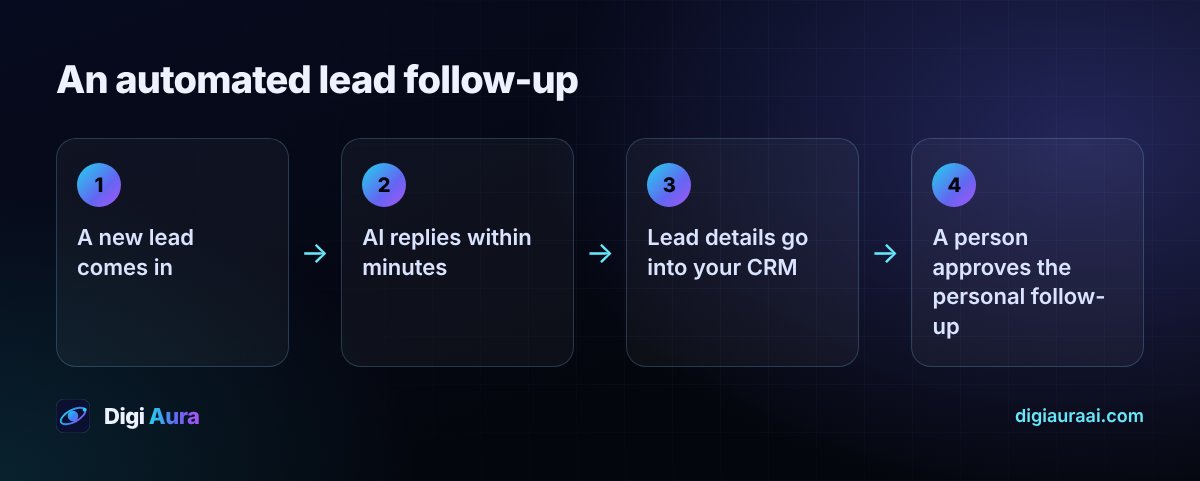
- List where leads come from. Website forms, email, phone, social media messages and directories.
- Pick one place to keep them. A CRM is best, but a well-organized spreadsheet can work at the start.
- Write your approved answers. Prices you share, service areas, timings and your next step.
- Set up the instant reply. Use AI to personalize it from the lead's message, using only your approved information.
- Add qualifying questions. Keep it to two or three, so it does not feel like a form.
- Connect booking. Let qualified leads pick a call time from your calendar.
- Add reminders and drafts. If a lead goes quiet, remind the team or draft a follow-up for approval.
- Review weekly. Read a sample of conversations and improve the answers.
How do you keep automated follow-up personal?
- Use the lead's own words. AI can reference what they asked about, which feels far more personal than a generic template.
- Sign it with a real name and make it easy to reply to a person.
- Keep a human in the loop for quotes, special requests and complaints.
- Do not over-message. One or two polite follow-ups are enough.
Which tools do you need for lead follow-up automation?
Most setups combine a website form or chat, a CRM, an email or text tool, a calendar and an automation platform with AI steps. You may already have most of these. See the best AI tools for small business for the main tool types, or let us build it with custom AI agents and AI automation services.
What mistakes should you avoid?
- Promising things in automated replies that a person has not approved.
- Sending texts or emails without the customer's permission. Follow the messaging and marketing rules that apply to you.
- Letting leads from different channels end up in different places.
- Never checking what the automation actually sent.
Frequently asked questions
How do I automate lead follow-up for a small business?
Connect your lead sources to one CRM, send an instant AI-personalized reply based on approved answers, ask a few qualifying questions, offer booking, and remind your team or draft follow-ups for approval.
Will automated replies feel robotic to customers?
Not if they are short, reference what the customer asked and come from a real person's name. AI makes personalization easier than old-style templates.
Do I need a CRM to automate lead follow-up?
A CRM makes it much easier, but you can start with a spreadsheet and move to a CRM as volume grows.
Can AI follow up with leads by text message?
Yes, if the customer has given permission and you follow the messaging rules that apply to your business. Many businesses start with email and add text later.
How fast should I follow up with a new lead?
As fast as you reasonably can. Automation lets you send a helpful first reply within minutes, even outside business hours.
Losing leads to slow replies? Book an AI consultation and we will map out your follow-up automation.