Short answer: there is no single best AI tool for a small business. The best setup is usually one general AI assistant (such as ChatGPT, Claude, Gemini or Microsoft Copilot) plus a few tools for specific jobs: automation, customer service, design and meeting notes. Pick tools by the task you want to fix, and check they connect to the software you already use.
New AI tools launch every week, so "best of" lists go out of date quickly. This guide groups tools by the job they do, so you can judge any new tool the same way.
What types of AI tools does a small business need?

Most small businesses get value from five types of AI tools:
| Type of tool | What it does | Well-known examples |
|---|---|---|
| General AI assistant | Writing, research, summaries, brainstorming, spreadsheet help | ChatGPT, Claude, Google Gemini, Microsoft Copilot |
| Automation platform | Moves data between apps and runs steps automatically | Zapier, Make, Microsoft Power Automate |
| Customer service AI | Answers questions on your website or phone line | Website chatbots, AI receptionists |
| Design and content | Social graphics, images, video and copy | Canva, Adobe Express |
| Meeting and note tools | Records, transcribes and summarizes calls | AI features in Zoom, Google Meet and Microsoft Teams |
You do not need all of them on day one. Start with the type that fixes your biggest time drain. Our guide on how to use AI in your business shows where each type fits.
Which AI assistant is best for small business?
ChatGPT, Claude, Gemini and Copilot are all capable. The differences come down to:
- Where you already work. If your business runs on Google Workspace, Gemini is built in. If you use Microsoft 365, Copilot fits naturally.
- Writing style. Some people prefer the tone of one assistant over another. Try the same task in two of them.
- Business plans and privacy. Team and business plans usually add admin controls and stricter data terms. Check each provider's current terms before sharing customer data.
Our guide to Claude AI for small business covers one assistant in detail, including its plans and privacy settings.
What are the best AI tools for automation?
Automation platforms connect your apps, such as your website forms, CRM, email and spreadsheets, so information moves without retyping. Most now include AI steps that can read an email, pull out details or draft a reply.
They are powerful but take time to set up and maintain. If you want to understand the idea first, read What is AI automation?. If you would rather have it built for you, that is what our AI automation services do. For a practical example, see how to automate social media posts.
What is the best AI tool for customer service?
For most small businesses, the best customer service tools are:
- A website chatbot trained on your own services, prices and policies. See AI chatbot development.
- An AI receptionist that answers calls when you are busy or closed. See AI receptionist for small business and how an AI receptionist works.
The tool matters less than the setup: approved answers, clear limits and an easy way to reach a person. Our guide to automating customer service explains how.
How do you choose the right AI tool?
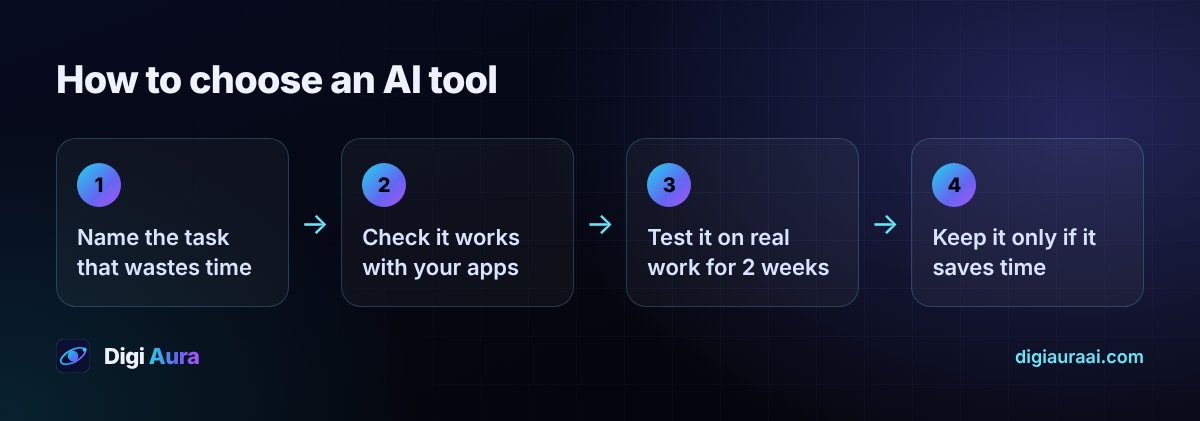
Use these four questions before you pay for anything:
- What task am I fixing? Name it, for example "replying to quote requests takes 5 hours a week."
- Does it connect to my tools? A tool that does not work with your CRM, calendar or email creates more copy-paste work.
- Does it pass a real test? Try it on real work for two weeks, not just a demo.
- Is my data safe? Read how the tool stores and uses your data, and who can see it.
Keep a tool only if it clearly saves time or wins customers. Cancel the rest. To keep up with new launches, read our weekly AI news for small business roundup.
What mistakes should you avoid with AI tools?
- Buying too many tools at once. Each one needs setup, logins and training.
- Trusting output without checking. AI can be confidently wrong. Review anything customer-facing.
- Ignoring connections. The real time savings come when tools talk to each other.
- Sharing sensitive data carelessly. Do not paste passwords, card numbers or private customer details into tools that are not approved for them.
If choosing and connecting tools feels like a project in itself, an AI consultant can help you pick a small, sensible set.
Frequently asked questions
What is the best AI tool for a small business?
There is no single best tool. Most small businesses do well with one general AI assistant plus a few task-specific tools for automation, customer service and design. Choose based on the task you want to fix and the apps you already use.
Are free AI tools good enough for a small business?
Free plans are good for trying tools and for occasional use. Paid or business plans usually add higher limits, team features and stronger data terms, which matter once staff use a tool every day.
Which AI tool is best for writing marketing content?
Any of the major AI assistants can draft posts, emails and website copy. Design tools such as Canva help with graphics. Always edit AI drafts so they match your brand and facts.
Can AI tools connect to my existing software?
Many can, either directly or through automation platforms like Zapier or Make. Check the tool's list of integrations before buying.
How much should a small business spend on AI tools?
Start small. Pay for one or two tools that solve a clear problem, measure the time they save, and add more only when the first ones prove their value.
Not sure which tools fit your business? Book an AI consultation and we will recommend a simple setup that works with the tools you already have.