Short answer: automating customer service means using tools such as AI chatbots, AI receptionists and automated email replies to handle routine customer questions and requests, day or night. The best setups answer from information you approve, collect the customer's details and pass anything complex or sensitive to a person.
For a small business, the goal is not to remove the human touch. It is to make sure no customer waits hours for an answer to a simple question, while your team spends its time where a person really makes a difference.
What does automating customer service mean?
It means letting software handle parts of the customer conversation that are repetitive and predictable. Typical examples:
- Answering questions about opening hours, prices, services and policies.
- Booking, confirming and rescheduling appointments.
- Taking messages and callback requests after hours.
- Sending order or job status updates.
- Collecting the details your team needs before they reply.
AI makes this much more natural than older tools. Instead of rigid menus ("press 1 for…"), an AI assistant understands questions written or spoken in everyday language.
Which customer service tasks can a small business automate?

| Task | Tool that fits | Keep a person for |
|---|---|---|
| Common questions on your website | AI chatbot | Unusual or sensitive questions |
| After-hours and missed calls | AI receptionist | Urgent calls, routed to your on-call number |
| Appointment booking and reminders | Chatbot or receptionist linked to your calendar | Special requests and exceptions |
| Email inquiries | AI that sorts and drafts replies | Approving and sending important replies |
| Follow-up and review requests | Automated messages after a visit or job | Responding to complaints |
How does an AI chatbot for customer service work?
A customer service chatbot is trained on your own information: services, prices, policies and frequently asked questions. When a visitor asks something, it answers in plain language using that information. When it cannot answer, or the visitor is ready to buy, it collects their name and contact details and passes the conversation to your team.
The most important part is the information you give it. A chatbot should answer only from approved content and say "I will pass this to the team" rather than guess. You can try the chatbot on this website to see how that feels. To see how chatbots differ from tools that also take actions, read AI agents vs chatbots, and to decide between a bot and a person, see chatbot vs live chat.
What is an AI receptionist?
An AI receptionist does a similar job on the phone. It answers calls with your business name, handles common questions, takes messages or booking requests, and routes urgent calls to a person. It is useful for businesses that miss calls while they are busy with customers, such as dental offices, salons and contractors. Read how an AI receptionist works for a step-by-step explanation.
How do you automate customer service step by step?
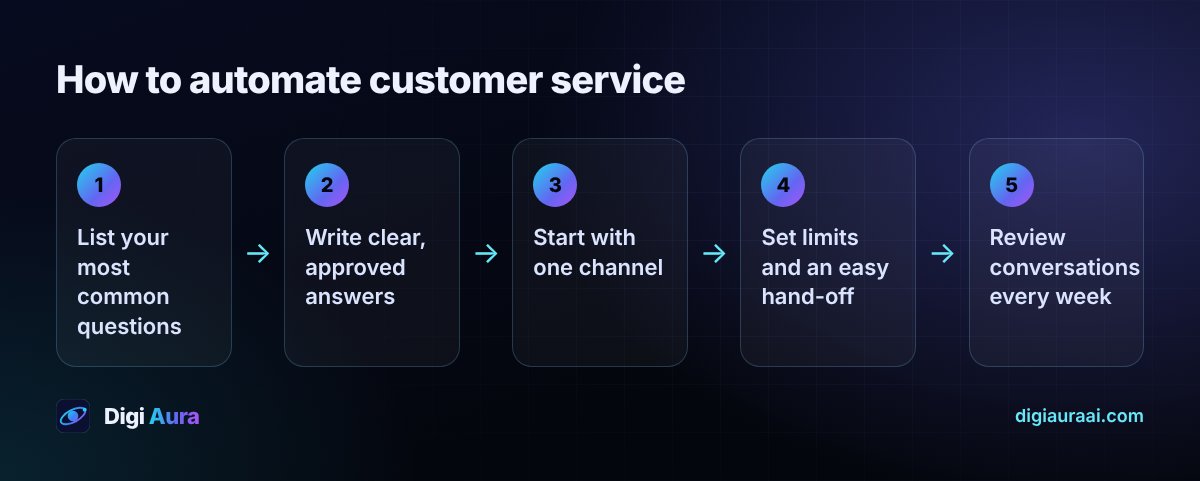
- List your most common questions. Look through recent emails, messages and calls. The same ten to twenty questions usually come up again and again.
- Write clear, approved answers. Keep prices, hours and policies up to date in one place.
- Pick one channel to start. Your website chat, phone line or email inbox, whichever gets the most routine questions.
- Set clear limits. Decide what the AI must never do, such as give medical or legal advice, promise refunds or quote custom prices.
- Design the hand-off. Make it easy for customers to reach a person, and make sure your team gets a summary, not just a raw transcript.
- Review conversations regularly. Read a sample each week, fix wrong or missing answers and add new questions.
What are the benefits of automating customer service?
- Faster first replies, including evenings and weekends.
- Fewer missed leads from calls and messages nobody had time to answer.
- Consistent answers, because everyone works from the same approved information.
- More time for your team to handle the conversations that need a human.
Results depend on your business and how well the system is set up, so it is worth starting small and measuring the difference.
What should stay human in customer service?
Some conversations should always reach a person:
- Complaints and upset customers.
- Refunds, billing disputes and anything about money.
- Medical, legal or safety questions.
- Requests that fall outside your normal services.
Good automation spots these and hands them over quickly. Customers should always know they are talking to an AI and have an easy way to reach a person.
Which industries benefit most?
Businesses with many inquiries and bookings gain the most. See how it works for healthcare and dental practices, salons, restaurants and contractors. For a wider view of what AI can take off your plate, read What is AI automation?.
If you want to try AI for drafting email replies yourself first, our guide to Claude AI for small business shows how to start.
Frequently asked questions
Can a small business automate customer service?
Yes. Tools like AI chatbots, AI receptionists and automated email replies can handle routine questions and bookings, while your team handles complex or sensitive conversations.
Will customers be annoyed talking to an AI?
Customers mainly want quick, accurate answers. Be open that it is an AI, keep answers short and correct, and make it easy to reach a person.
What is the difference between a chatbot and an AI receptionist?
A chatbot answers in writing, usually on your website or messaging apps. An AI receptionist answers phone calls by voice. Both can use the same approved information.
How do I stop an AI chatbot from giving wrong answers?
Train it only on approved information, tell it to hand over when it is unsure, set topics it must avoid and review conversations regularly.
How long does it take to set up customer service automation?
A focused chatbot or answering setup can often be live within a few weeks. Connecting several systems, such as a calendar and a CRM, takes longer.
Want fewer missed inquiries and faster replies? Book an AI consultation and we will help you decide which parts of your customer service to automate first.